.svg)


What is CSP?
Content Security Policy is a defensive mechanism implemented in all major browsers that enables us to whitelist resources we would like to allow to appear on our website. So that if we do not explicitly allow some domain, or if we do not whitelist inline scripts etc. they would not be allowed to execute.
The entire mechanism is very straightforward, just add Content-Security-Policy header, enumerate directives and sources you would like to allow, and here you go. Example directives are:
- script-src - for setting policies for JavaScript inline and external scripts,
- style-src - same for css,
- default-src - applies to all elements that could have not been assigned to a more specific policy (it does not include policies enumerated in base-uri and some others),
- report-uri - if we want to get reports about violations - set uri. You will get a JSON summary of what happened, you can work on later.
Of course, this list is much longer and policies for base uris, objects, images and so on can be set. Also keep in mind that if a policy for, say, CSS was found in style-src, it will not try to match against default-src. These values are not inherited. And, once again: some directives are given the default value.
Content Security Policy - sources
When it comes to sources, the following options are available (among others):
- self - allow same domain (https://example.com, http://www.example.com are different domains),
- none - disallow,
- host with or without path (eq. example.com, example.com/res/main.js, https://example.com)
- unsafe-inline - allow inline scripts,
- nonce - set “nonce” value for each request for each element you want to allow. This requires strong cryptographic tokens,
- sha-<algorithm>-<base64> - count sha256, 364 or 512 and encode it with base64 for each element you want to allow.
Note that when using “self” policy, inline scripts will be blocked, since they are the most common way of injecting JavaScript code into the website. Of course, the unsafe-inline policy may be used, but it’s preferred to go with nonce or sha policies.
The CSP allows reporting and testing the policies we write. If you have a big project with lots of distributed resources and are afraid of unintentionally blocking access to them, making your website inaccessible, you may want to set Content-Security-Policy-Report-Only header instead.
Attack scenario: exploiting XSS vulnerabilities in a web application
In our case, we have a website that allows users to make use of some customization. They can, for instance, adjust the page’s look and behavior by choosing which CSS and JavaScripts they would like to load. Of course, as responsible entrepreneurs, we limit this choice to options coming from trusted sources (like the ones created by own developers) or use other techniques to provide safety. Otherwise, we would risk a keylogger being injected making it possible to steal data user types, losing session cookies, which would allow an attacker to login as another person (and this would happen even if no actual password leaks) and more.
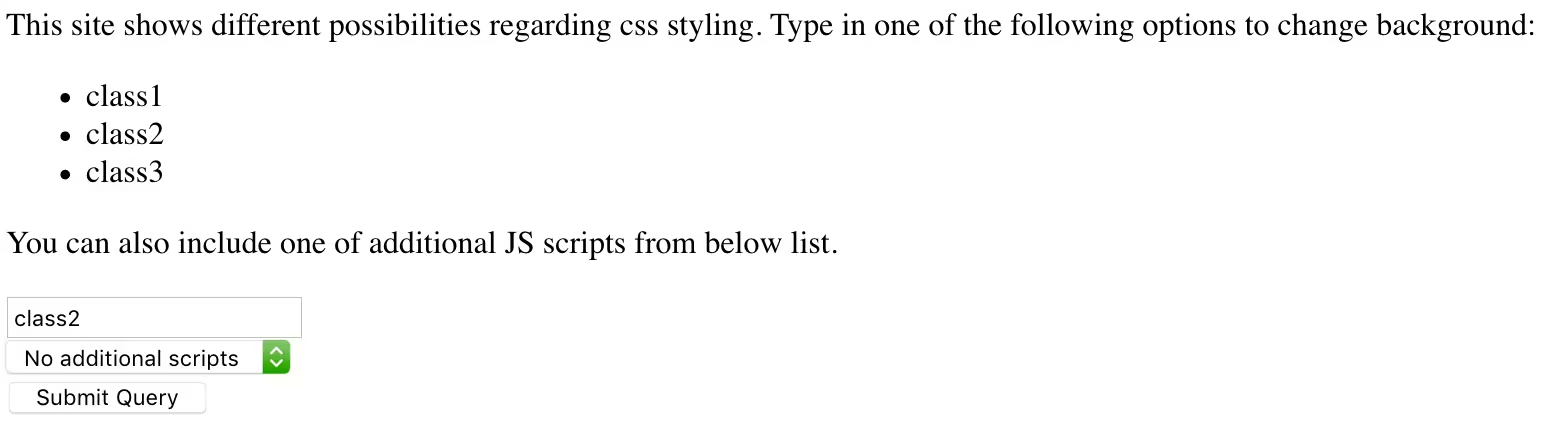
Additionally, one inline script was used that logs some message to console. It is only used that we have correctly defined our policies. If it gets blocked, this means we have configuration issues. Right now It works smoothly:

Choices are strictly limited and any attempt of tampering with them is stopped. If a user tries to type “<script>alert(1)</script>” nothing will happen since all HTML special characters are escaped and the resulting html file will look like this:
<<body class=<script>alert(1)</script>>>
<p id="main-paragraph">
This site shows different possibilities regarding css styling. Type in one of the following options to change background:
</p>
Until we notice a lack of apostrophes around our input which leads us to an idea. What will happen if we type “class1 onclick=alert(2)”? Bingo!
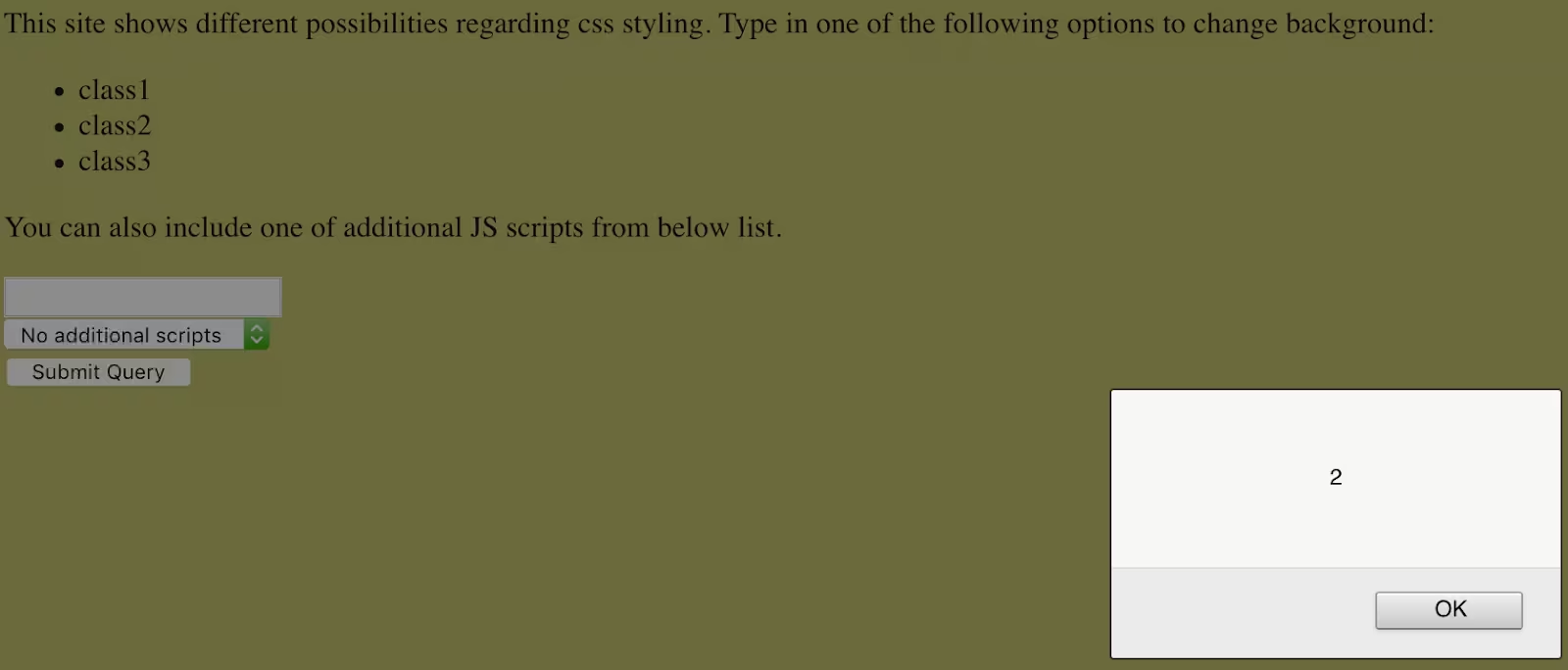
As a side note: if we wanted to insert any string into this field (for example in order to connect to an external server to upload stolen data) it would also become escaped leaving potential attacker nowhere near causing any actual harm. But there are two magical functions: eval() and String.fromCharCode(). If we wanted to display “You’ve been pwned!” message we would fail:
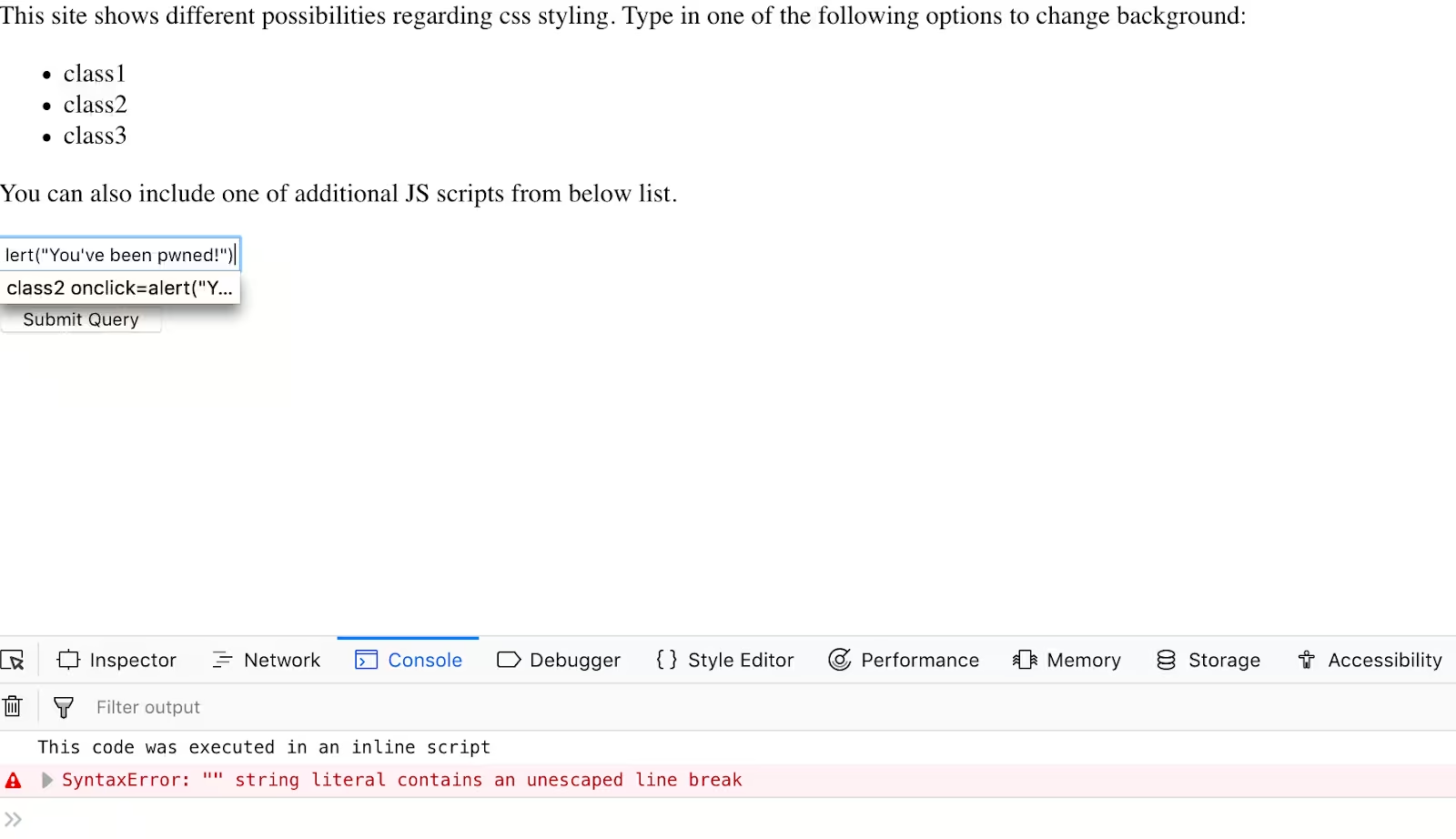
But if we encoded the malicious payload with two Python lines of code:
In [1]: s = '''alert(\"You've been pwned!\")'''

In [2]: print(','.join((str(ord(c)) for c in s)))
97,108,101,114,116,40,34,89,111,117,39,118,101,32,98,101,101,110,32,112,119,110,101,100,33,34,41
and inserted these numbers encapsulated in eval(String.fromCharCode()) instead:

we would end up being able to accomplish our task.
Let’s take a look at the dropdown which allows us to load a JavaScript that triggers a change in the first paragraph look:
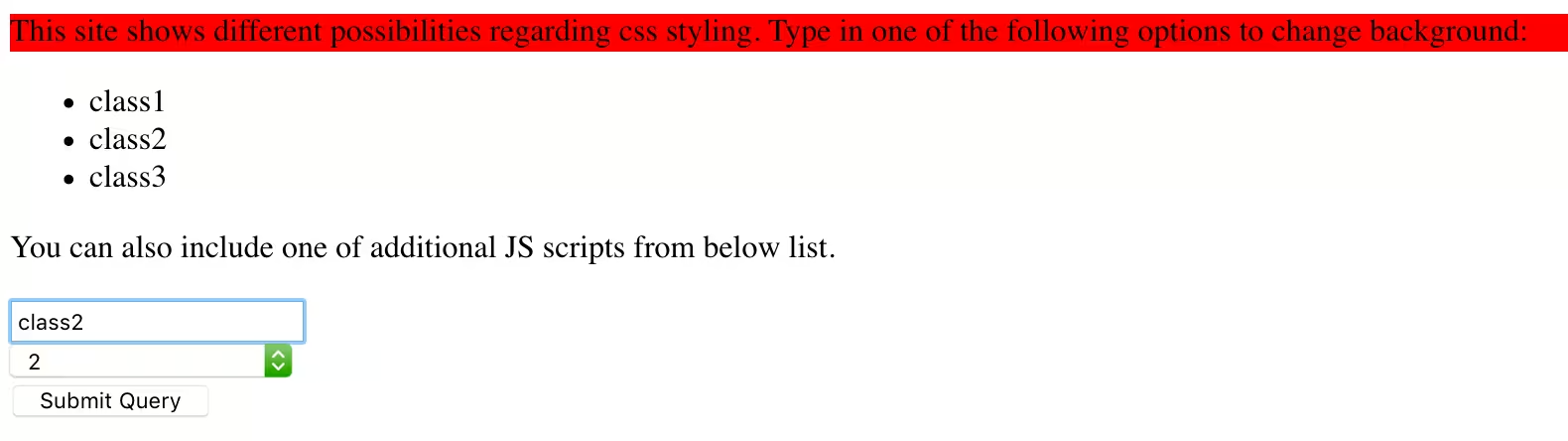
This HTML code will be returned the by server when we type in “class2” in the text field and select option “2” from a dropdown. As can be seen, a relative URL to load script is rendered:
<form method="POST" action="/" id="mainForm">

 <input type="text" name="css_class"> <br/>

 <select name="additional_script">

 <option value="">No additional scripts</option>

 <option value="/static/js/additional1.js">1</option>

 <option value="/static/js/additional2.js">2</option>

 </select><br/>

 <input type="submit" name="submit"><br/>

</form>

<script src="/static/js/additional2.js"></script>
And what if we somehow change the url? Let’s write a script that shows another alert box and post it on pastebin and then manipulate choices list.

This was possible because we were able to change the link to point to external, untrusted source.
<form method="POST" action="/" id="mainForm">

 <input type="text" name="css_class"> <br/>

 <select name="additional_script">

 <option value="">No additional scripts</option>

 <option value="/static/js/additional1.js">1</option>

 <option value="/static/js/additional2.js">2</option>

 </select><br/>

 <input type="submit" name="submit"><br/>

</form>

<script src="https://pastebin.com/raw/R570EE00"></script>
Two inputs and two vulnerabilities. This does not look promising. Of course, we have to take measures to deal with these problems but what if the same developer, most probably unaware of the threats, fails again in the future? Or attacker finds another way to inject malicious code into our website? Can we take a more global approach? Check the second part of the article showing how to implement CSP using Python frameworks - Flask and Django (coming next week). See also django-trench - our own open-source library providing multi-factor authentication for Django.
Note: This is not a technical manual though and if you wish to check how to apply it in your particular use case, please look at the reference links. The correctness of implementation details should be checked by a professional pentester or security consultant.
If you’re interested in rising your programming skills in the security area, why don’t do it with our backend team? Here’re our job offers for backend developers!
References
English:
https://developer.mozilla.org/en-US/docs/Web/HTTP/CSP
Polish:
https://sekurak.pl/xss-w-google-colaboratory-obejscie-content-security-policy/
CSP Implementation in Flask
So you’ve already got to know the Attack Scenario. Now we can check the CSP solution of the problem in Flask and Django. It seems that rescue is within a few keyboard clicks. The only changes I introduce in my project is adding an endpoint for receiving reports which will be printed out to console and adding a wrapper to secure my only view in the Flask application I’ve created.
The only two changes I had to make are here (one for import, one for decorating the view):
+from flask import Flask, render_template, request, make_response
+
+from csp import csp

app = Flask(__name__)


@app.route('/', methods=['GET', 'POST'])
+@csp
def home():
The code implementing changes is also rather uncomplicated.
SETTINGS_REPORT_CSP = {

 'default-src': [
 '\'self\'',
 ],
 'script-src': [
 '\'self\'',
 '\'sha256-pu1SeSVRQwuLmgKFdpgMzTi7ghm2F3Ldi/iw1Ff6Myc=\''
 ]

}


# Same rules for CSP, except for this will only report violations.
SETTINGS_REPORT_CSP = {}
REPORT_URI = '/report-csp-violations'


def make_csp_header(settings, report_uri=None):
 header = ''
 for directive, policies in settings.items():
 header += f'{directive} '
 header += ' '.join(
 (policy for policy in policies)
 )
 header += ';'
 if report_uri:
 header += f' report-uri {report_uri}'
 return header


def csp(func):
 @wraps(func)
 def _csp(*args, **kwargs):
 response = make_response(func(*args, **kwargs))
 if SETTINGS_REPORT_CSP:
 response.headers[
 'Content-Security-Policy-Report-Only'
 ] = make_csp_header(SETTINGS_REPORT_CSP, REPORT_URI)
 if SETTINGS_CSP:
 response.headers[
 'Content-Security-Policy'
 ] = make_csp_header(SETTINGS_CSP, REPORT_URI)
 return response
 return _csp
Let’s stop here and talk a little bit about some of the details. Settings are kept as a dictionary enumerating directives and sources. In our case the default-src will apply to CSS stylesheets, allowing those of them located under http://localhost:5000/* to load. Same applies to JavaScript files with one exception. Here we do allow an inline script whose contents we’ve calculated using sha-256 algorithm and then by encoding the result with base64. This means strictly contents of this script:
<script>console.log('This code was executed in an inline script')</script>
If we change a typo inside of it, we have to recalculate its hash and encode it. If we, on the other hand, want to change tag’s class or id, setting it to <script id=”some-script”>, no further changes need to be introduced, since only contents are taken into consideration.
Only report policy has been set, so we expect the malicious code to execute, but the browser should notify us about this fact and send a report to '/report-csp-violations'.
Testing
Let’s try our code again. How will it respond to class1 onclick=alert(1)?

As you can see, Chrome is aware of the problem and has sent a proper report to our endpoint which simply logs it to the console:
@app.route('/report-csp-violations', methods=['POST'])
def report():
 pprint.pprint(json.loads(str(request.data, 'utf-8')))
 response = make_response()
 response.status_code = 200
 return response
Output:
127.0.0.1 - - [28/Jan/2019 13:06:40] "POST /report-csp-violations HTTP/1.1" 200 -
{'csp-report': {'blocked-uri': 'inline',
 'document-uri': 'http://localhost:5000/',
 'original-policy': "default-src 'self'; script-src 'self' "
 "'sha256-pu1SeSVRQwuLmgKFdpgMzTi7ghm2F3Ldi/iw1Ff6Myc='; "
 'report-uri '
 'http://localhost:5000/report-csp-violations',
 'referrer': 'http://localhost:5000/',
 'source-file': 'http://localhost:5000/',
 'violated-directive': 'script-src'}}
Malforming links in the dropdown list will also be stopped (when we change the header from report only to actual prevention):
[Report Only] Refused to load the script 'https://pastebin.com/raw/R570EE00' because it violates the following Content Security Policy directive: "script-src 'self' 'sha256-pu1SeSVRQwuLmgKFdpgMzTi7ghm2F3Ldi/iw1Ff6Myc='". Note that 'script-src-elem' was not explicitly set, so 'script-src' is used as a fallback.
What is also important for us is the fact that in the parts of the website we wanted to work, no problems occur. We can still choose one of the themes:

And customize background scripts behave:

The inline script we had earlier also is up and running:

At this point, we could change the policy to actually block the crackers going after our precious website. In the project, I have also prepared an example using nonce which creates a disposable token for each resource. This solution requires more work but is still useful. The security decorator will look like this:
SETTINGS_REPORT_CSP = {
 'default-src': [
 '\'self\'',
 ],
 'script-src': [
 '\'self\'',
 '\'nonce-{}\''
 ]
}
REPORT_URI = '/report-csp-violations'


def get_nonce():
 return secrets.token_hex()


def make_csp_header(settings, nonce, report_uri=None):
 header = ''
 for directive, policies in settings.items():
 header += f'{directive} '
 header += ' '.join(
 (
 policy if 'nonce' not in policy
 else policy.format(nonce)
 for policy in policies
 )
 )
 header += ';'
 if report_uri:
 header += f' report-uri {report_uri}'
 return header


def csp(func):
 @wraps(func)
 def _csp(*args, **kwargs):
 nonce = get_nonce()
 response = make_response(func(*args, **kwargs, inline_script_nonce=nonce))
 if SETTINGS_REPORT_CSP:
 response.headers[
 'Content-Security-Policy-Report-Only'
 ] = make_csp_header(SETTINGS_REPORT_CSP, nonce, REPORT_URI)
 if SETTINGS_CSP:
 response.headers[
 'Content-Security-Policy'
 ] = make_csp_header(SETTINGS_CSP, nonce)
 return response
 return _csp
With newly defined get_nonce() function that uses Python’s cryptographic function to generate a token, function responsible for creating header now has to discover the where to put it (it can’t be set in settings since nonce is generated per request), and we pass it to our view which uses it while rendering the template:
@app.route('/', methods=['GET', 'POST'])
@csp
def home(inline_script_nonce):
 context = {
 'css_class': 'class1',
 'additional_script': None,
 'inline_script_nonce': inline_script_nonce
 }
 if request.method == 'POST':
 if request.form['css_class']:
 context['css_class'] = request.form['css_class']
 if request.form['additional_script']:
 context['additional_script'] = request.form['additional_script']
 return render_template('home.html', **context)
Little changes to the script and here we go:
<script nonce="{{ inline_script_nonce }}">console.log('This code was executed in an inline script')</script>
Final setup
Once we’ve ensured that we have defined our policies correctly we can move on to changing it from report-only mode to actually blocking malicious input. We introduce following changes in our source code (the light-blue color on the left indicates what has been changed):
SETTINGS_CSP = {
 'default-src': [
 '\'self\'',
 ],
 'script-src': [
 '\'self\'',
 '\'sha256-pu1SeSVRQwuLmgKFdpgMzTi7ghm2F3Ldi/iw1Ff6Myc=\''
 ]
}


# Same rules for CSP, except for this will only report violations.
SETTINGS_REPORT_CSP = {}
REPORT_URI = '/report-csp-violations'


def make_csp_header(settings, report_uri=None):
 header = ''
 for directive, policies in settings.items():
 header += f'{directive} '
 header += ' '.join(
 (policy for policy in policies)
 )
 header += ';'
 if report_uri:
 header += f' report-uri {report_uri}'
 return header


def csp(func):
 @wraps(func)
 def _csp(*args, **kwargs):
 response = make_response(func(*args, **kwargs))
 if SETTINGS_REPORT_CSP:
 response.headers[
 'Content-Security-Policy-Report-Only'
 ] = make_csp_header(SETTINGS_REPORT_CSP, REPORT_URI)
 if SETTINGS_CSP:
 response.headers[
 'Content-Security-Policy'
 ] = make_csp_header(SETTINGS_CSP, REPORT_URI)
 return response
 return _csp
And now let’s check whether any of the problems persist. The malicious input in CSS class selector has been detected, stopped and reported.
Content Security Policy: The page’s settings blocked the loading of a resource at inline (“script-src”).
No alert box:

And a part of the report logged by server:
127.0.0.1 - - [28/Jan/2019 13:06:40] "POST /report-csp-violations HTTP/1.1" 200 -
{'csp-report': {'blocked-uri': 'inline',
 'document-uri': 'http://localhost:5000/',
 'original-policy': "default-src 'self'; script-src 'self' "
 "'sha256-pu1SeSVRQwuLmgKFdpgMzTi7ghm2F3Ldi/iw1Ff6Myc='; "
 'report-uri '
 'http://localhost:5000/report-csp-violations',
 'referrer': 'http://localhost:5000/',
 'source-file': 'http://localhost:5000/',
 'violated-directive': 'script-src'}}
Trying to load script from untrusted source has also failed:
(index):1 Refused to load the script 'https://pastebin.com/raw/R570EE00' because it violates the following Content Security Policy directive: "script-src 'self' 'sha256-pu1SeSVRQwuLmgKFdpgMzTi7ghm2F3Ldi/iw1Ff6Myc='". Note that 'script-src-elem' was not explicitly set, so 'script-src' is used as a fallback.
And our backend has been informed about that fact:
127.0.0.1 - - [28/Jan/2019 13:15:59] "POST /report-csp-violations HTTP/1.1" 200 -
{'csp-report': {'blocked-uri': 'https://pastebin.com/raw/R570EE00',
 'disposition': 'enforce',
 'document-uri': 'http://localhost:5000/',
 'effective-directive': 'script-src-elem',
 'original-policy': "default-src 'self';script-src 'self' "
 "'sha256-pu1SeSVRQwuLmgKFdpgMzTi7ghm2F3Ldi/iw1Ff6Myc='; "
 'report-uri /report-csp-violations',
 'referrer': 'http://localhost:5000/',
 'script-sample': '',
 'status-code': 200,
 'violated-directive': 'script-src-elem'}}
And we were also able to maintain site’s functionality:

Content Security Policy in Django
In this example I have implemented the policy from scratch, manually adding proper headers, in order to show the implementation in details. Django unfortunately, does not provide any built-in mechanisms that we could make use of, but fortunately, Mozilla Foundation has created a library that could be used immediately. Just import this library, use settings listed in the docs and you are ready to go. All the work we have done could be limited to these lines of code:
INSTALLED_APPS = [
 # ...
 'csp',
 # ...
]
MIDDLEWARE = [
 # ...
 'csp.middleware.CSPMiddleware',
]


# CSP
CSP_DEFAULT_SRC = ("'self'",)
CSP_SCRIPT_SRC = ("'self'", "'sha256-pu1SeSVRQwuLmgKFdpgMzTi7ghm2F3Ldi/iw1Ff6Myc='")
CSP_REPORT_URI = '/report-csp-violation/'
And an endpoint to log violations:
def report_csp_violation(request):
 pprint.pprint(
 json.loads(request.body.decode('utf-8'))
 )
 return HttpResponse(status=200)
If we want to change the policy for a specific view, appropriate decorators like @csp_exempt or @csp_update are available.
CSP - report-only mode helps
The implementation of CSP may be pretty straightforward. Thanks to the possibility of the report-only mode, it can be set up immediately without risking any downtime to our services due to misconfigurations with an option of adjusting it while it’s being used.
Please, keep in mind, however, that:
- Using CPS does not solve your bugs. They still exist, although harder to exploit.
- This article is not a complete guide or technical reference. In order to ensure that you used CSP mechanism correctly, consult your solution with a professional.
In order to view the project please visit Merixstudio's Git Hub. All versions of what we’ve done here are tagged properly if you would like to review differences. See also django-trench - our own open-source library providing multi-factor authentication for Django.
If you’re interested in rising your programming skills in the security area, why don’t do it our backend team? Here’re our job offers for backend developers!

.svg)
.svg)
.svg)
.avif)

.avif)
.avif)
.avif)
